



For businesses, this creates a new area for analysis: it is important to understand not only whether a brand or website is mentioned in AI-generated answers, but also whether these recommendations bring actual users to the website and which pages they visit.
In this article, we will explain how to set up an AI traffic report in GA4, which AI sources can be tracked, the limitations of this approach, and how to use the data to further improve your website’s visibility in AI search.
What Is AI Traffic?
AI traffic refers to users visiting a website from ChatGPT, Gemini, Perplexity, Copilot, and other AI services. For example, a user asks ChatGPT a question, receives an answer containing a link to an article or company page, and follows that link to the website.
It is important to distinguish between several levels of website visibility in AI-generated answers:
- mention or citation — an AI service uses information about a company or its content in an answer but may not provide a clickable link to the website;
- link appearance — a website page appears among the sources or recommendations in an AI-generated answer, but the user does not necessarily click it;
- website visit — the user clicks a link in the AI service and lands on the website.
Google Analytics 4 can track the final stage — an actual user visit to the website — provided that the AI service passes information about the traffic source. A brand mention, content citation, or link appearance without a click is not recorded in GA4.
Therefore, AI traffic data in GA4 should not be treated as a complete measure of a brand’s AI visibility. It represents only the portion of interactions with AI services that resulted in users visiting the website.

Which AI Traffic Sources Can You See in GA4?
If an AI service passes information about the traffic source, GA4 can identify this traffic using Session source. In addition, visits from AI services may appear under the dedicated AI Assistant channel in the Session primary channel group, while Session source/medium may use ai-assistant as the medium.
However, not all AI traffic may be classified under the AI Assistant channel. For a more comprehensive analysis, we also recommend checking the Session source for the domains of specific AI services, such as chatgpt.com, gemini.google.com, or perplexity.ai.
Some of the main AI services whose traffic may appear in GA4 include:
| AI Service | Example Session Source |
| ChatGPT | chatgpt.com |
| Gemini | gemini.google.com |
| Perplexity | perplexity.ai |
| Microsoft Copilot | copilot.microsoft.com |
| Claude | claude.ai |
This list is not exhaustive. New AI services continue to emerge, while domains and the way traffic source data is passed may change over time. This data refers to information that a browser passes to a website when a user follows a link, helping GA4 determine where the user came from. When this information is passed correctly, GA4 can identify, for example, chatgpt.com or gemini.google.com as the session source.
At the same time, not every visit from an AI service will necessarily be correctly identified in GA4. This depends on how a particular AI service generates links and passes traffic source information. For example, in some cases, ChatGPT may use an intermediate URL or redirect before sending the user to the final website page, which can also affect the source data received by the analytics system. As a result, the actual volume of AI traffic may differ from the number of visits that can be clearly identified as AI traffic in GA4.
What Can You Learn About AI Traffic in GA4?
Tracking AI traffic in GA4 allows you not only to see that a user arrived from an AI assistant but also to analyze how these users behave on your website.
Depending on how your GA4 report is configured, you can determine:
- which AI service the user came from — for example, ChatGPT, Gemini, or Perplexity;
- when the visit occurred — data can be analyzed by specific dates or over a selected period;
- which page the user landed on — helping you identify the content and pages that receive the most AI traffic;
- the number of users and sessions — to evaluate the volume of traffic from each AI source;
- user engagement — for example, the number of engaged sessions and other engagement metrics;
- key events and conversions — if configured in GA4, you can evaluate whether users coming from AI services complete target actions on the website.
This allows you to compare different AI traffic sources, identify pages that are already receiving AI traffic, and evaluate not only the volume of these visits but also their quality.
At the same time, GA4 does not show the exact query a user submitted to an AI assistant, the response they received, or the context in which the AI recommended a particular page.
How to Create an AI Traffic Report in GA4
Google Analytics 4 does not have a ready-made standard report that separately shows traffic from AI assistants. However, you can create one using Explore and use it for regular monitoring.
Step 1. Create a New Exploration
In your Google Analytics 4 account, navigate to Explore in the left-hand menu.
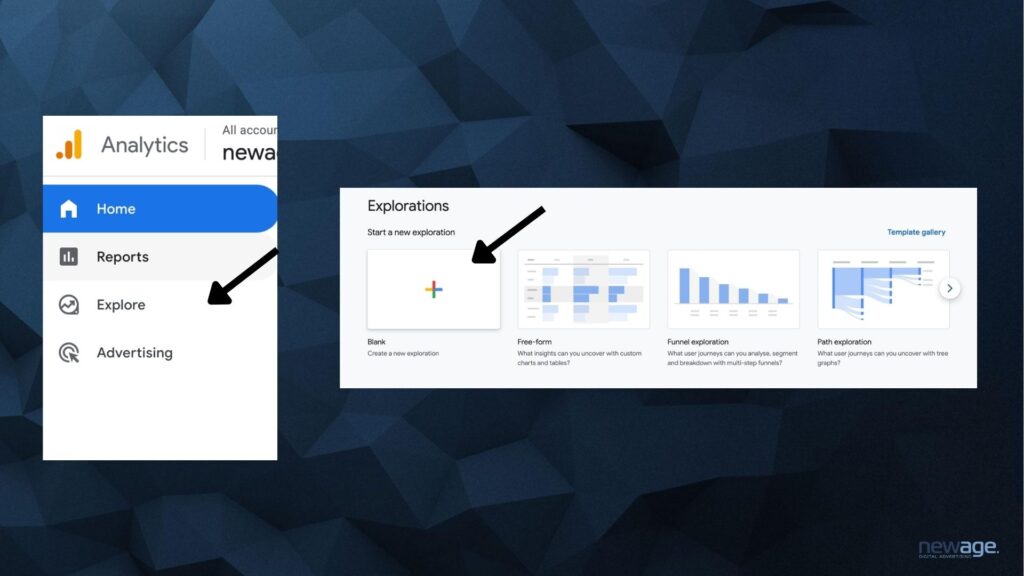
Select Blank to create a new exploration from scratch. This is where you will build a table containing your AI traffic data.
Step 2. Add Dimensions
In the Variables column, click the “+” next to Dimensions and use the search bar to add:
- Session source;
- Landing page + query string;
- Date.
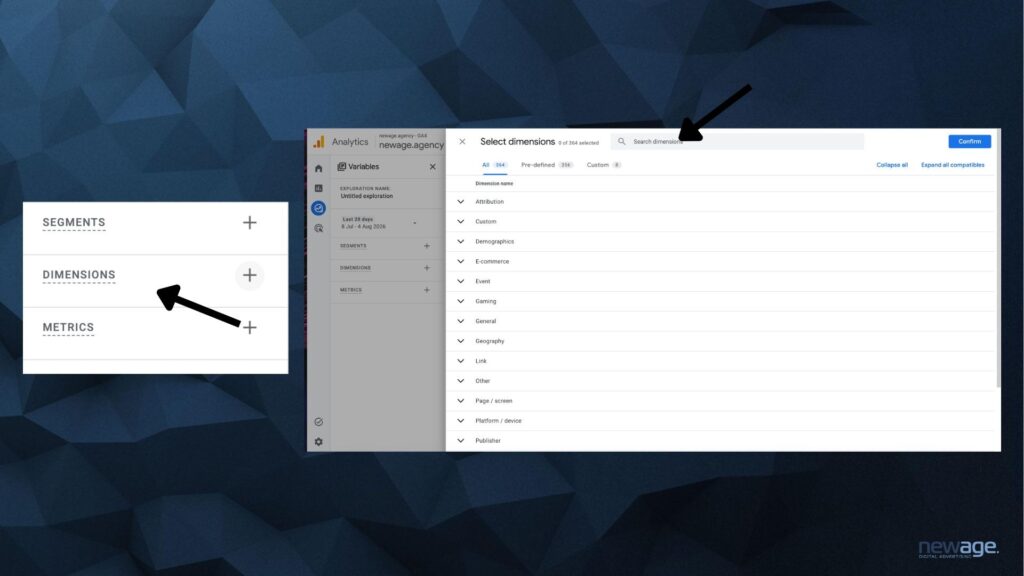
After selecting the dimensions, click Confirm to save them.
For AI traffic analysis, we recommend using Session source. It allows you to filter traffic without relying on the medium. This is important because the same AI service may appear in GA4 with different medium values, such as referral or (not set).
Landing page + query string help identify the page a user landed on after clicking a link in an AI service, while Date allows you to analyze these visits by specific days.
Step 3. Add Metrics
Next, click the “+” next to Metrics and add the metrics you want to analyze. For a basic report, you can use:
- Active users — the number of active users;
- Sessions — the number of sessions;
- Engaged sessions — the number of engaged sessions;
- Key events — the number of key events.
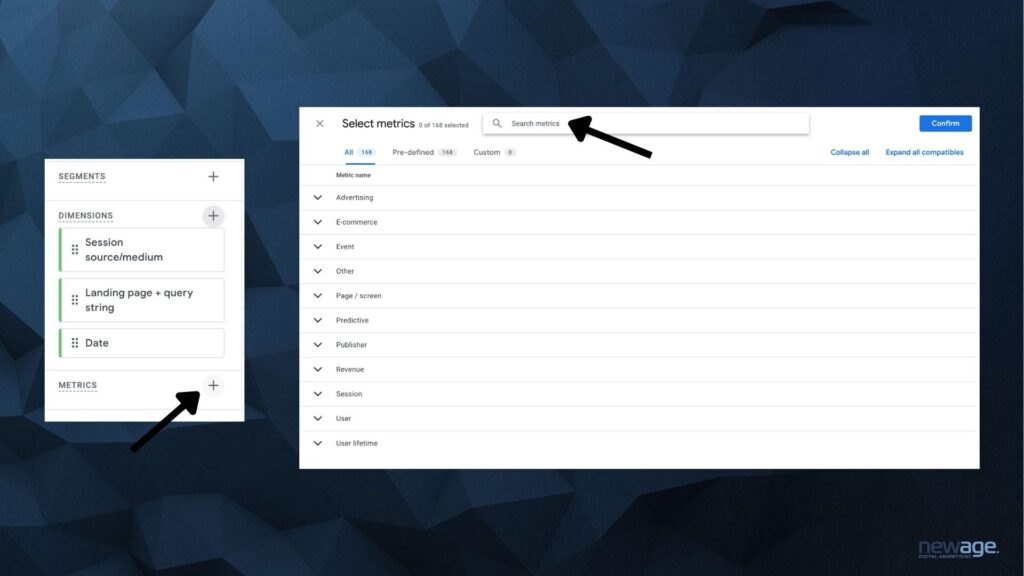
After selecting the metrics, click Confirm.
The set of metrics can be adjusted depending on your goals. For example, if you only need to identify which pages receive traffic from ChatGPT, Active Users and Sessions are sufficient. If you want to evaluate the quality of this traffic, you should also analyze engagement and key events.
Step 4. Build the Table
Now you need to define the structure of the report.
In the Rows section, add:
- Session source;
- Landing page + query string.
In the Values section, add:
- Active users;
- Sessions.
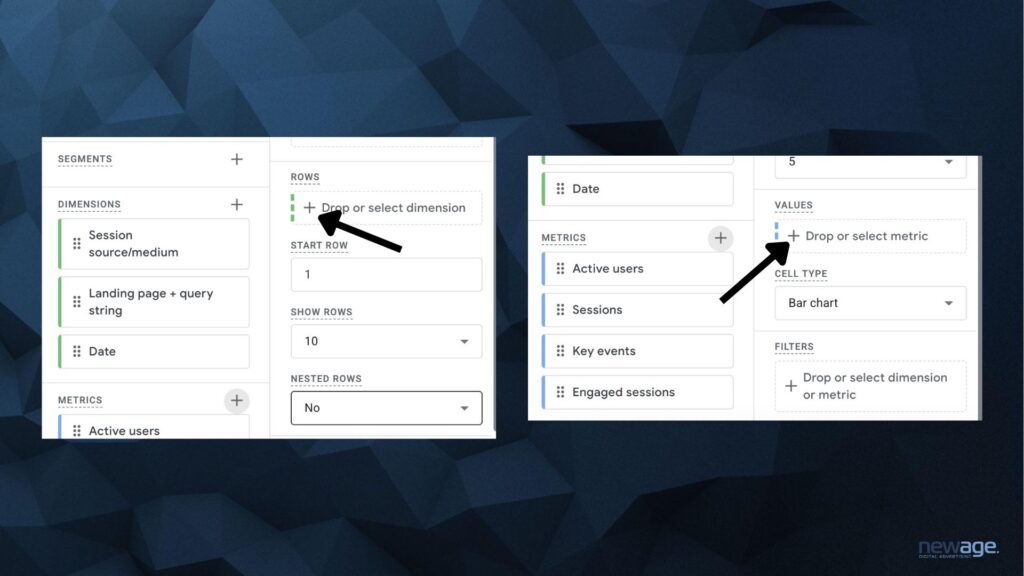
If needed, you can also add Engaged sessions, Key events, and other metrics to the Values section.
The table will then display all traffic sources and the pages users landed on. The next step is to filter the data so that only traffic from the relevant AI service remains.
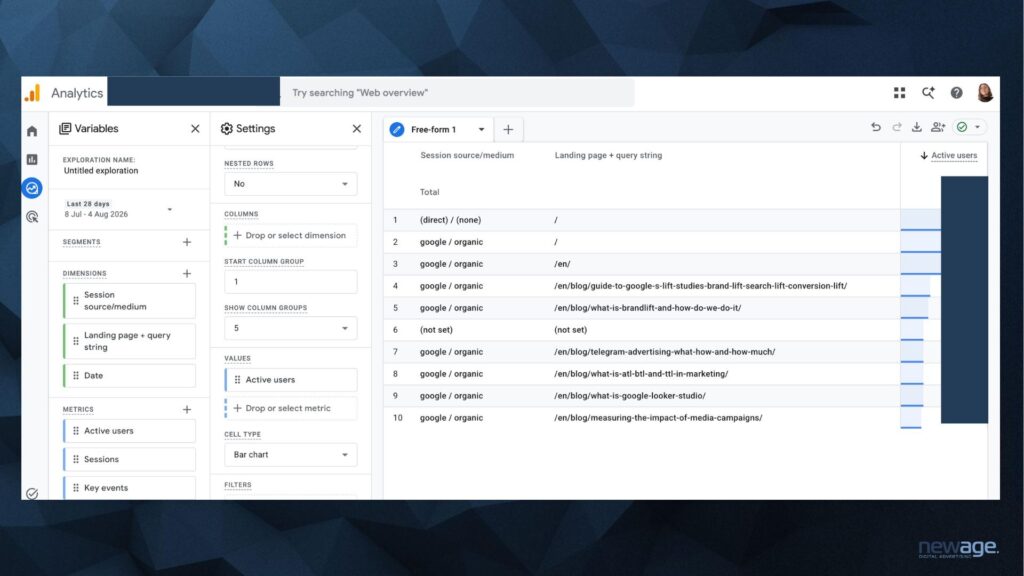
Step 5. Filter AI Traffic
In the Settings column, scroll down to the Filters section and select Session source.
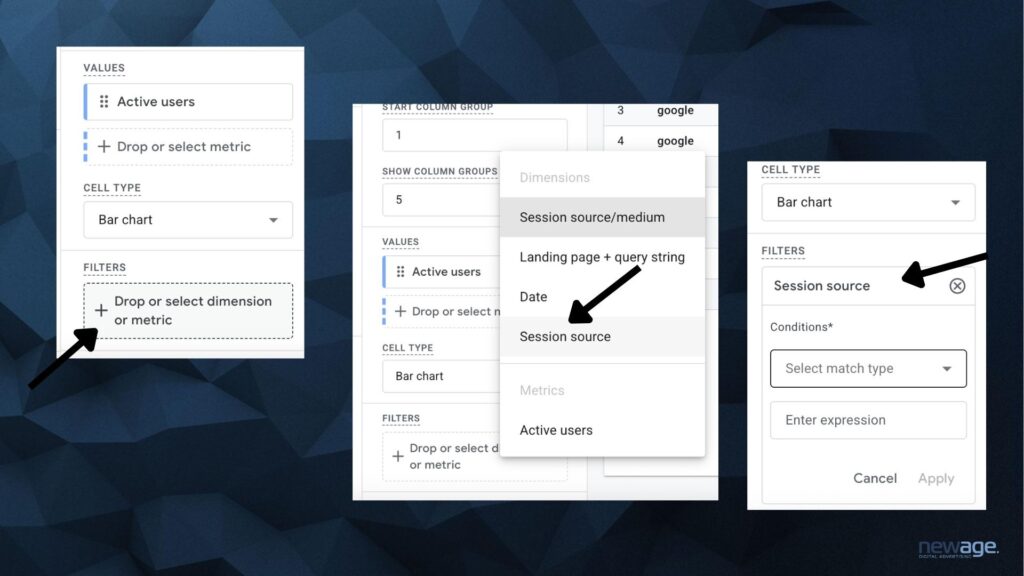
In the Match type field, select Matches regex, then enter the domain of the AI service you want to track in the Expression field.
For example, for ChatGPT: chatgpt.com
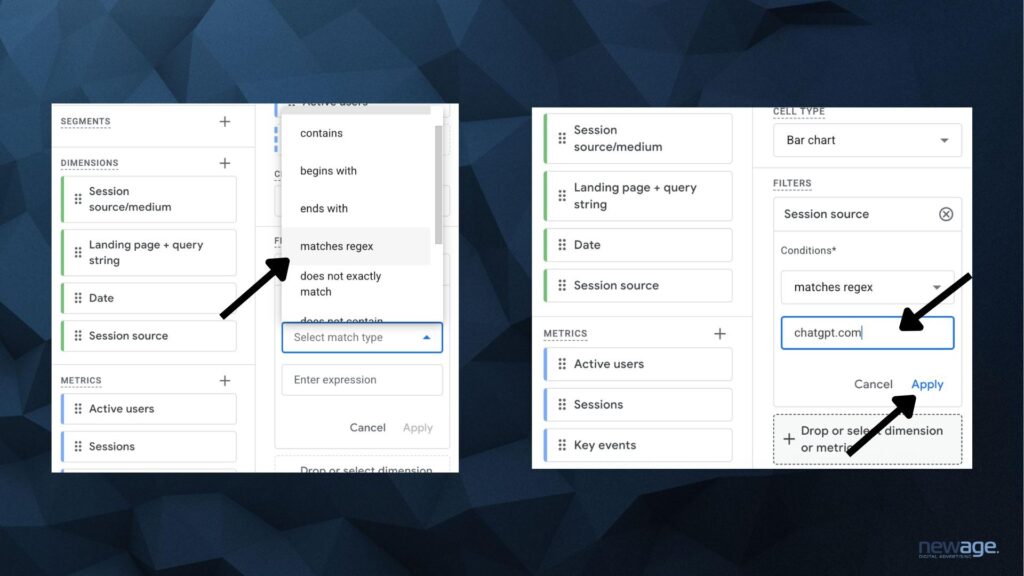
After clicking Apply, the table will display only the visits for which ChatGPT was identified as the session source.
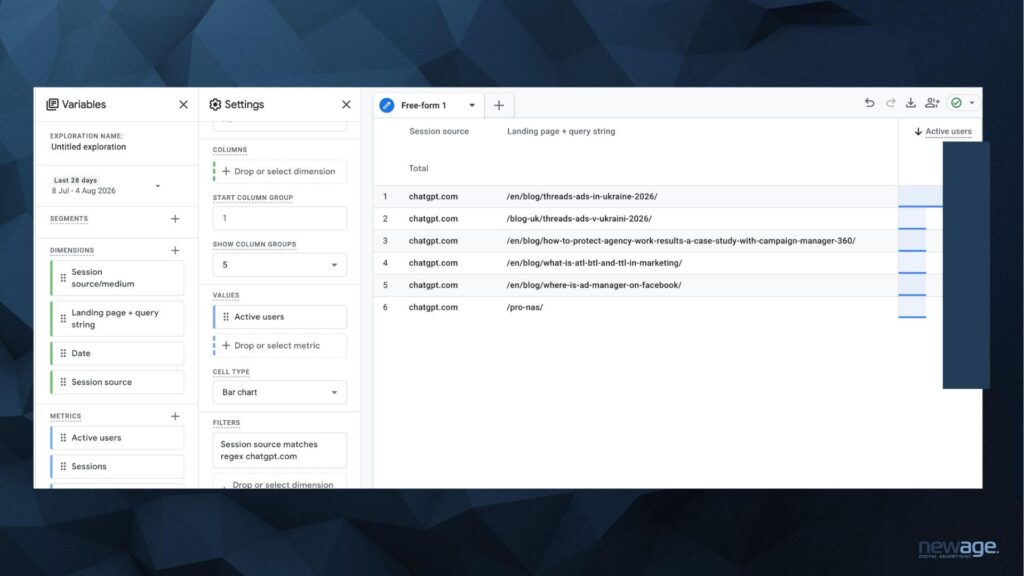
You can use the same approach to check other AI services:
- Gemini — gemini.google.com;
- Perplexity — perplexity.ai;
- Microsoft Copilot — copilot.microsoft.com;
- Claude — claude.ai.
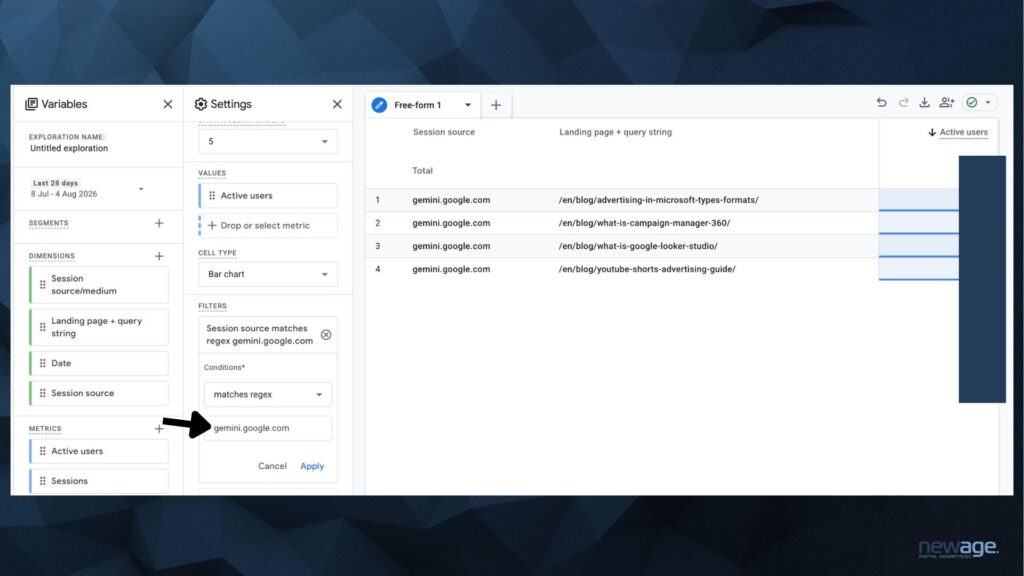
While testing the report, we also encountered a particular behavior in GA4 Explore: combining multiple AI sources in a single regular expression may return incomplete data or no data at all, even when each source is identified correctly when checked separately. To ensure data accuracy, we recommend analyzing AI services individually by changing the domain in the filter for each service.
Step 6. Add the Date
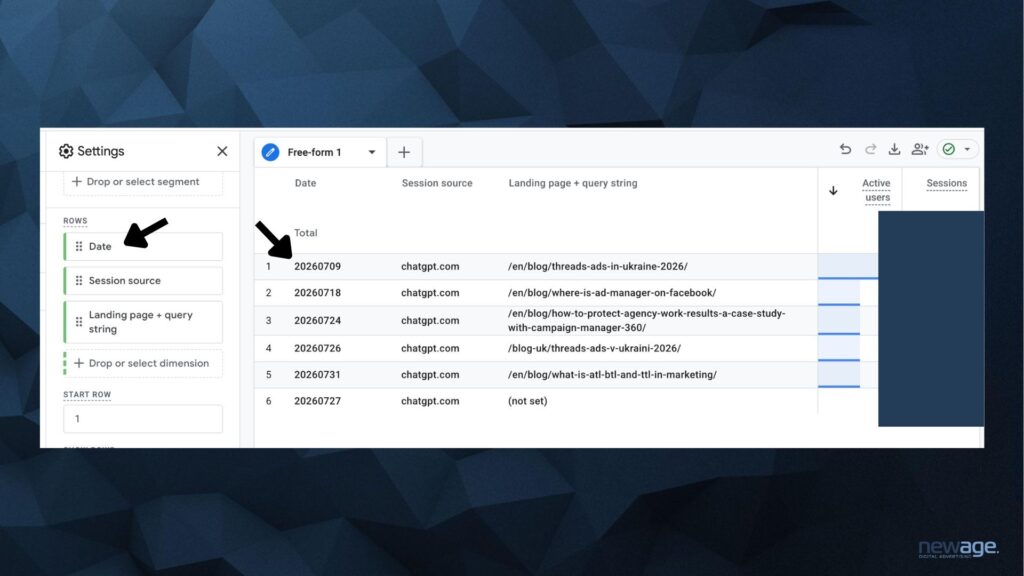
If you want to see not only the total number of visits for the selected period but also the specific dates when they occurred, add Date to the Rows section.
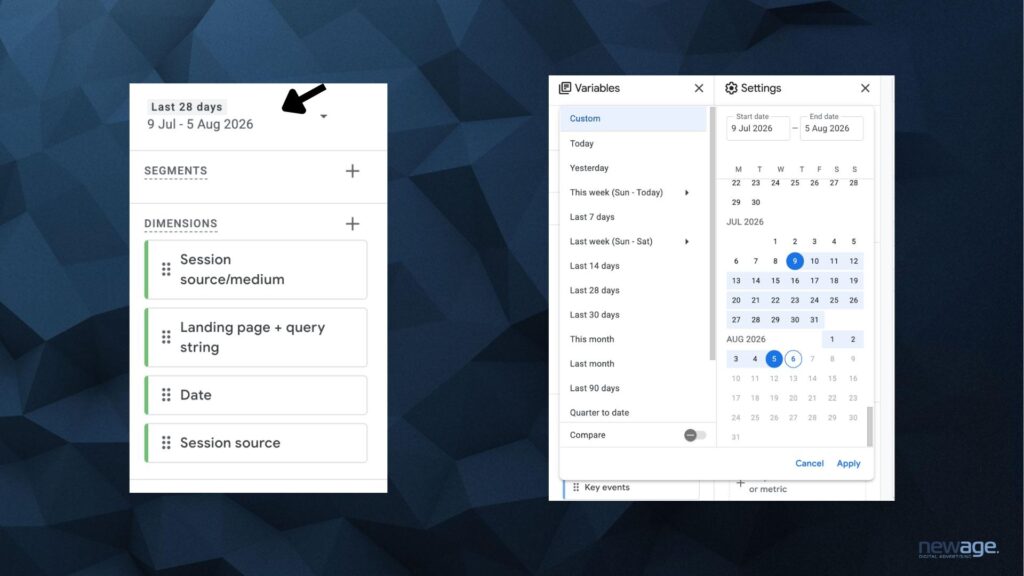
In this case, we recommend using the following order:
- Date;
- Session source;
- Landing page + query string.
The table will show when the visit occurred, which AI service the user came from, and which page of the website they landed on.
Step 7. Export the Data
The completed report can be exported from GA4 for further analysis.
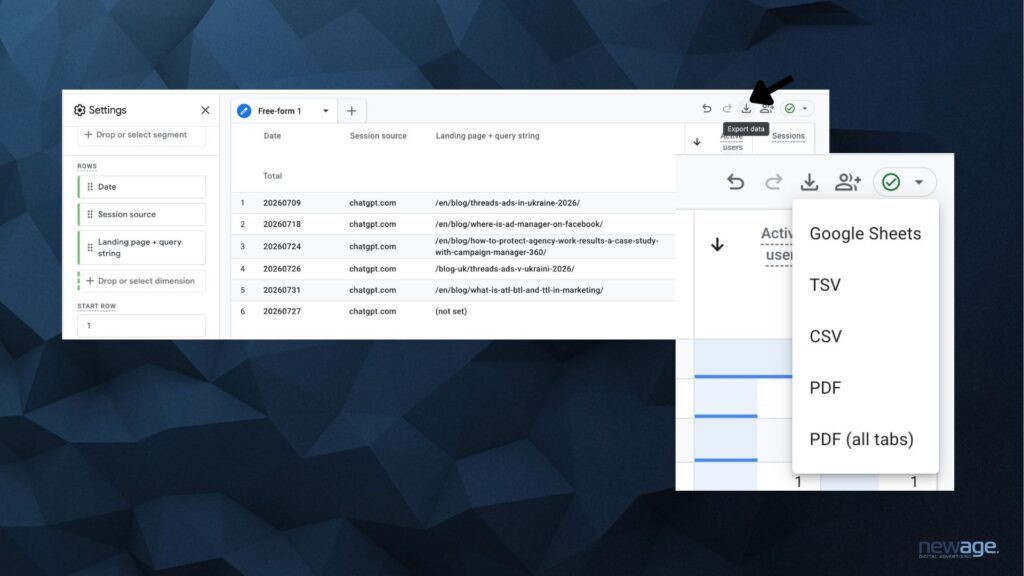
In the upper-right corner of Explore, click Export data and select the format you need. For example:
- Google Sheets — for further analysis and working with the data in a spreadsheet;
- CSV — for downloading and analyzing the data in Excel or other tools;
- TSV;
- PDF — if you want to save the report in its current visual format.
Before exporting, make sure you have selected the correct date range and AI service in the filter.
If you need to collect data from several AI assistants, you can change the Session source in the filter one by one and export the results for ChatGPT, Gemini, Perplexity, and other services. The exported data can then be combined into a single table for further comparison.
For regular monitoring, you can also create a separate AI traffic report in GA4 and add it to the Library. Once the relevant collection is published, the report will be available in the Reports section alongside other GA4 reports. This is useful for teams that want to monitor AI traffic regularly without having to open Explore and configure the filters each time.
Can You Track Traffic from Google AI Overview in GA4?
Unlike ChatGPT, Gemini, or Perplexity, Google AI Overview does not pass a separate traffic source to GA4 that would allow you to clearly identify visits specifically from AI-generated answers. These visits are included in Google Search traffic and cannot be separated from regular organic search traffic in GA4.
Therefore, it is currently not possible to create a filter such as AI Overview in GA4 and separately view the number of users, sessions, or conversions generated specifically by this format.
At the same time, Google includes website appearances and clicks from AI Overviews in Search Console. A click on an external link in an AI Overview is counted as a click from Google Search, while a link appearance is counted as an impression according to Search Console rules.
In 2026, Google also began testing a separate Generative AI performance report in Search Console. It provides data on website visibility across Google Search generative AI features, including AI Overviews and AI Mode, such as impressions, pages, countries, devices, and performance trends over time. The report is currently being gradually tested with a limited number of websites, so it may not yet be available in every Search Console account.
What About Google AI Mode?
The situation is similar to Google AI Mode — an AI-powered search experience where users can ask complex questions, receive generated answers with links to sources, and continue the conversation with follow-up queries.
In GA4, visits from AI Mode also do not have a separate Session source that would allow them to be reliably distinguished from other Google Search traffic.
However, interactions with AI Mode are included in Search Console: when a user clicks an external link, it is counted as a click; when a link appears, it is counted as an impression; and each follow-up question in AI Mode is treated as a new query for the calculation of the relevant metrics.
In addition, the new Generative AI performance report in Search Console covers both AI Overviews and AI Mode. As this report becomes more widely available, Search Console is becoming Google’s primary tool for analyzing website visibility across its generative search features.

How to Improve Your Website’s Visibility in ChatGPT and Other AI Services
The appearance of AI traffic in GA4 indicates that your website content is already being used by AI services as a source or recommendation that brings users to your site. The next step is to understand which factors can help increase this visibility.
Answer Specific User Queries
Users turn to AI assistants for more than just short informational queries. They ask them to compare products, find suitable solutions, explain complex topics, recommend options, or provide step-by-step instructions.
Therefore, when planning content, it is important to focus not only on individual keywords but also on the real questions, needs, and tasks of your audience.
These can include content formats such as:
- “How to…?”;
- “What to choose for…?”;
- “What is the difference between…?”;
- “Which is better: X or Y?”;
- “How does… work?”;
- step-by-step instructions and guides;
- comparisons of products, services, or approaches.
It is important not to create a separate page for every possible variation of a query. A single high-quality piece of content can comprehensively answer the main question while also addressing related follow-up questions.
Create Content That AI Can Easily Use as a Source
The information on a page should not only be useful to users but also clearly structured. Individual statements, definitions, and answers should be easy to understand even without reading the entire article.
To achieve this, consider using:
- a logical H2 and H3 structure;
- short, direct answers to questions;
- lists and step-by-step instructions;
- comparison tables;
- FAQs covering common questions;
- clear definitions of key terms;
- up-to-date data and statistics with cited sources.
At the same time, structure alone will not help a website “get into ChatGPT.” Its purpose is to make information clear, specific, and easy to use as a source.
Demonstrate Expertise and Create Original Data
It is much harder to stand out among hundreds of pages that simply repeat the same publicly available information. That is why content that adds something new to the topic can provide particular value.
This can include:
- original research;
- statistics and data analysis;
- case studies with real results;
- experiments;
- expert commentary;
- proprietary methodologies;
- practical examples and observations.
Such content can become a primary source referenced by other websites, media outlets, and industry publications. This helps strengthen the brand’s expertise while also expanding its presence across external sources.
Build Your Brand’s Presence Beyond Your Own Website
AI visibility is not limited to optimizing your company website. Information about a company, product, or expert can appear across various independent sources that are accessible to AI systems.
That is why it is important to build a broader brand presence across the information landscape:
- publish expert content in relevant and authoritative media;
- invest in Digital PR;
- earn relevant external mentions and backlinks;
- provide expert commentary on research and current industry topics;
- distribute your own research and data;
- ensure that information about your brand is accurate across external sources.
The goal should not be to simply increase the number of brand mentions, but to build a consistent and trustworthy information ecosystem around the brand.
Analyze Content That Is Already Receiving AI Traffic
AI optimization should not be based on assumptions alone. GA4 data can be used as a feedback loop to gradually identify which approaches are working for your website.
Regularly analyze:
- which landing pages receive the most AI traffic;
- which AI services users are coming from;
- which topics are covered on these pages;
- what content formats and structures are used;
- how up to date the content is;
- how AI-referred audiences interact with the pages;
- whether these users complete key actions.
AI services are gradually becoming a new touchpoint between users and brands. People use ChatGPT, Gemini, Perplexity, and other tools to find information, compare options, choose products, and get answers to specific questions. Therefore, website visibility in AI-generated answers is becoming another important area to consider as part of a digital marketing strategy.
FAQ: Frequently Asked Questions About Tracking AI Traffic in GA4
Can You Track Traffic from ChatGPT in Google Analytics 4?
Yes. If ChatGPT passes information about the traffic source, GA4 can identify this traffic by Session source, for example, chatgpt.com. This allows you to see the number of users and sessions, landing pages, engagement metrics, and key events.
Which AI Services Can Be Tracked in GA4?
In addition to ChatGPT, GA4 may identify traffic from Gemini, Perplexity, Microsoft Copilot, Claude, and other AI services. Whether a specific source can be identified depends on whether the service passes referral data when a user clicks through to the website.
Can You Track Traffic from Google AI Overview in GA4?
Currently, traffic specifically from Google AI Overview cannot be isolated in GA4. These visits are included in Google Search traffic and do not have a separate Session source that would allow them to be reliably distinguished from regular organic search traffic.
Can You See Which Query Led a User to Your Website from ChatGPT?
No. GA4 can record a visit from ChatGPT and the page the user landed on, but it does not show the user’s query, the AI-generated response, or the context in which the link was recommended. Analyzing brand visibility without website visits requires separate monitoring of mentions and citations across AI services.
How Can You Improve Your Website’s Visibility in ChatGPT and Other AI Services?
Focus on creating content that answers specific user questions, structuring information clearly, regularly updating existing content, publishing original research, case studies, and expert insights, and building an authoritative brand presence across external sources. There is no single optimization technique that guarantees your website will appear in AI-generated answers, so improving AI visibility requires a comprehensive approach.