

July 10, 2026
Over the past few years, YouTube Shorts has become one of the platform's primary video content formats.
YouTube Shorts Advertising: A Guide
July 10, 2026
Over the past few years, YouTube Shorts has become one of the platform's primary video content formats.
Oleksandra Svistova
Billions of short-form vertical videos are viewed every day, and advertising in this format has become an integral part of the Google Ads ecosystem. Thanks to its broad reach, mobile-first experience, and seamless integration with Google’s advertising tools, YouTube Shorts gives businesses new opportunities to build brand awareness, engage audiences, and achieve a wide range of marketing objectives.
The newage. team started testing YouTube Shorts ads in the early stages of the format’s development and has since gained extensive hands-on experience running campaigns for advertisers across various industries. In this article, we’ll explain how YouTube Shorts advertising works today, which Google Ads campaign types support the format, what creative requirements you should consider, and share practical recommendations for getting the most out of YouTube Shorts campaigns.
What Is YouTube Shorts Advertising?
YouTube Shorts is YouTube’s short-form vertical video format. Originally introduced in response to the growing popularity of short-form content, it has since become an integral part of the YouTube ecosystem. Users browse Shorts through a vertical feed, quickly swiping from one video to the next.
YouTube Shorts ads are seamlessly integrated into the Shorts feed and appear between organic videos. This creates a native viewing experience, allowing brands to engage users while they are actively consuming content. Unlike traditional YouTube in-stream ads, which play before, during, or after long-form videos, Shorts ads can be skipped with a simple swipe. As a result, the opening seconds of your creative are critical to capturing the viewer’s attention.
Depending on the campaign type, YouTube Shorts supports a variety of marketing objectives. Businesses can use the format to increase reach, drive video views, generate website traffic, promote mobile apps, and achieve other business goals by leveraging Google Ads and Google AI-powered optimization.

Why Businesses Should Use YouTube Shorts
YouTube Shorts has evolved from an experimental feature into a fully integrated part of the Google Ads ecosystem. Today, businesses can use Shorts to support a wide range of marketing objectives — from building brand awareness to driving website traffic and conversions, depending on the campaign type.
Broad Advertising Reach
YouTube Shorts ads appear within YouTube’s vertical feed, which is viewed by millions of users around the world every day. For advertisers, this provides access to one of the largest sources of video inventory across Google’s advertising ecosystem. In addition, Demand Gen campaigns can reach more than 3 billion monthly active users across Google’s visual surfaces, including YouTube Shorts.
Mobile-First Experience
YouTube Shorts is designed primarily for mobile viewing. Full-screen vertical videos occupy the entire smartphone display, giving brands maximum screen space to communicate their message without competing with additional interface elements that could distract viewers.
Integration with Google Ads
YouTube Shorts ads are managed through Google Ads and can run alongside other YouTube ad formats, depending on the campaign type. This allows advertisers to use familiar audience targeting, bidding strategies, analytics, and measurement tools — all within a single advertising platform, without the need for a separate ad account.
AI-Powered Campaign Optimization
Modern Google Ads campaigns leverage Google AI to identify the most effective combinations of creative assets, placements, and audiences. In particular, Demand Gen campaigns use Google AI to optimize ad delivery and help advertisers scale performance across YouTube, including Shorts.
Flexibility for Different Business Goals
Depending on the campaign type, YouTube Shorts ads can be used to increase reach, generate video views, drive website traffic, promote mobile apps, or encourage conversions. This makes the format suitable for both brand awareness campaigns and performance-focused initiatives aimed at achieving specific business outcomes.
Who Watches YouTube Shorts?
Based on our experience, the YouTube Shorts audience largely overlaps with the broader YouTube audience. While short-form vertical videos are often associated with younger users, our campaigns have shown that Shorts can effectively reach a wide range of age groups, depending on the content category, targeting settings, and campaign objectives.
Across multiple campaigns, we consistently observed strong ad delivery among users aged 25–34 and 35–44. In some cases, these age groups accounted for the largest share of total reach. However, audience distribution ultimately depends on the advertiser, the product or service being promoted, and the campaign settings.
Another advantage of the format is the large volume of available ad inventory. Because users quickly scroll through the Shorts feed, the platform offers more opportunities to serve ads between videos than traditional long-form content. This gives advertisers greater potential to scale campaigns and achieve broad reach.
At the same time, YouTube Shorts should not be viewed as a completely separate audience. In most cases, it consists of the same YouTube users who simply consume content in a different format. That’s why campaign planning should be based not only on the placement itself, but also on your target audience, content category, and overall marketing objectives.

Which Campaign Types Support YouTube Shorts Ads?
Today, YouTube Shorts is supported across several Google Ads campaign types. The right choice depends on your marketing objectives, whether you’re looking to build brand awareness, increase video views, drive website traffic, or promote a mobile app.
| Campaign Type | Supports Shorts | Primary Purpose |
|---|---|---|
| Demand Gen | ✅ | Drive customer acquisition, website traffic, and conversions using Google AI. |
| Video Reach Campaign | ✅ | Maximize unique reach and increase brand awareness. |
| Video View Campaign | ✅ | Maximize video views. |
| Performance Max | ✅ | Achieve business goals across all Google advertising channels, including Shorts. |
| App Campaigns | ✅ | Promote mobile apps and drive installs or in-app actions. |
What’s the Difference Between These Campaign Types?
- Demand Gen is designed for businesses looking to engage potential customers during the consideration stage, drive website traffic, and generate conversions. These campaigns use Google AI to automatically optimize ad delivery and can run across YouTube, including Shorts, as well as other Google visual surfaces.
- Video Reach Campaign focuses on maximizing unique reach and increasing brand awareness. If your goal is to deliver your message to as many people as possible, this campaign type is one of the best options.
- Video View Campaign is optimized to generate the highest possible number of video views within your available budget. It’s the right choice when your primary objective is to maximize video consumption.
- Performance Max automatically serves ads across all eligible Google channels, including YouTube Shorts. However, you cannot choose Shorts as the only placement in a Performance Max campaign—the system automatically determines where to show your ads to achieve your campaign goals.
- App Campaigns are designed to promote mobile apps by driving installs and in-app actions. Shorts can also be used as one of the available ad placements within these campaigns.
Important: Only certain campaign types allow you to run ads exclusively in YouTube Shorts. With Video Reach Campaign and Video View Campaign, you can choose Shorts as the only placement. In contrast, Demand Gen, Performance Max, and App Campaigns use Shorts as one of several available placements and typically deliver ads across multiple Google surfaces.
How to Launch YouTube Shorts Ads
YouTube Shorts ads are created and managed through Google Ads. While the setup process varies depending on the campaign type, the overall workflow is largely the same.
1. Create a New Campaign
In Google Ads, click New Campaign and choose the marketing objective that aligns with your business goals. Depending on your strategy, this could include Brand Awareness, Video Views, Website Traffic, Conversions, or App Promotion.
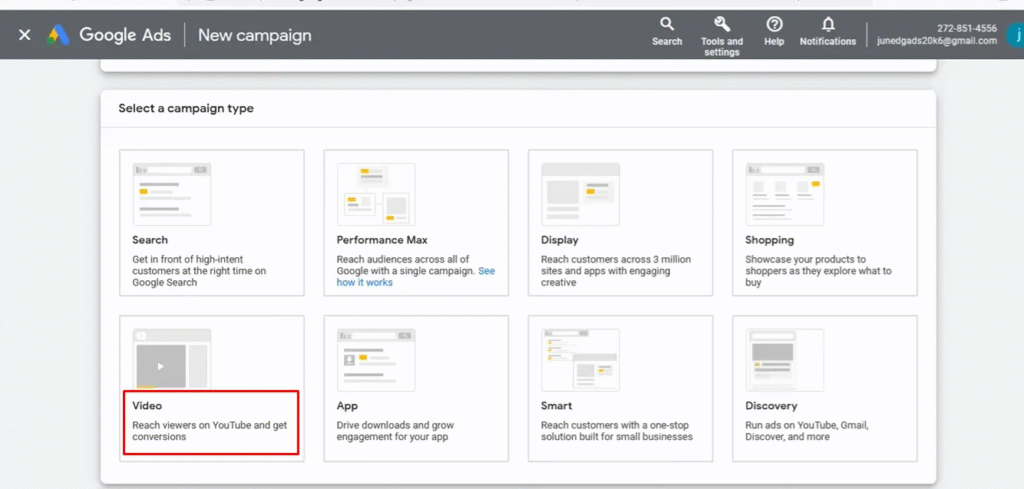
2. Choose a Campaign Type
Depending on your marketing objective, select a campaign type that supports YouTube Shorts placements. Available options include Demand Gen, Video Reach Campaign, Video View Campaign, Performance Max, and App Campaigns. Keep in mind that available features, targeting options, and placement controls vary depending on the campaign type you choose.
3. Add Your Creative
For YouTube Shorts ads, Google recommends using vertical videos with a 9:16 aspect ratio. While Google Ads supports other video formats, vertical creatives provide the best viewing experience in the Shorts feed and are best suited to how users consume short-form content.
4. Define Your Target Audience
Next, configure your targeting settings, including location, language, demographics, interests, audience segments, or custom segments, depending on the capabilities of your chosen campaign type.
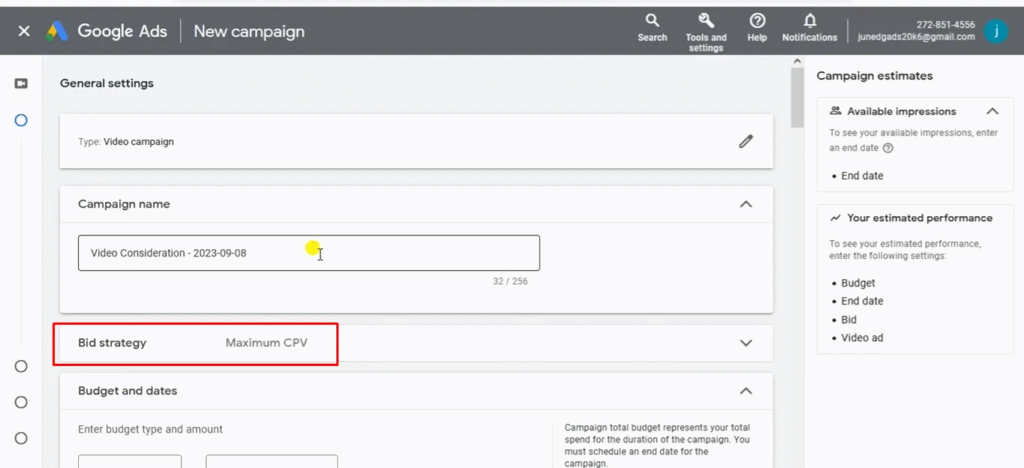
5. Select a Bidding Strategy
Google Ads offers a variety of bidding strategies based on your campaign type and marketing objectives. Depending on your goals, campaigns can be optimized for maximum reach, video views, conversions, or other key performance indicators. The available bidding strategies will vary according to the campaign type you select.
6. Review Your Settings and Launch the Campaign
Before publishing, review your campaign settings, budget, creative assets, and targeting configuration. Once submitted, your campaign will go through Google’s ad review process. After approval, your ads will begin serving based on the selected campaign type and the available placements.
Important: If you want your ads to appear exclusively in YouTube Shorts, make sure to verify the capabilities of your selected campaign type. Not all Google Ads campaigns allow advertisers to target Shorts as a standalone placement. In many cases, Google’s algorithms automatically distribute ad delivery across YouTube and other eligible Google surfaces.
Video Requirements for YouTube Shorts
To ensure your ads display correctly in YouTube Shorts and provide the best viewing experience on mobile devices, it’s important to follow both Google Ads’ technical requirements and the recommended creative best practices.
Technical Requirements
Google recommends using vertical videos with a 9:16 aspect ratio, as they are best suited to the Shorts format and make full use of the smartphone screen. Although Google Ads supports other aspect ratios, vertical creatives provide the most seamless viewing experience in the Shorts feed.
It’s also recommended to use high-quality video assets and follow the general Google Ads specifications for supported file formats, resolutions, and file sizes.
Best Practices
Beyond the technical requirements, the effectiveness of YouTube Shorts ads largely depends on the quality of the creative itself.
- Keep your videos concise. Although YouTube Shorts now supports longer videos, short and dynamic creatives generally align better with how users consume content in the Shorts feed.
- Introduce your brand from the very beginning. Since viewers can swipe to the next video at any moment, it’s best to feature your logo, product, or key message within the first few seconds.
- Use captions or on-screen text. These elements help communicate your message even when viewers are watching without sound.
- Include a clear call to action (CTA). Whether your goal is to drive website visits, app installs, or another type of engagement, make it clear what action you want viewers to take next.
- Keep key visual elements near the center of the frame. The YouTube Shorts interface includes interactive elements such as action buttons and channel information, so it’s best to avoid placing text, logos, or other important visual elements too close to the edges of the video.

Best Practices for YouTube Shorts Ads
Meeting the technical requirements alone isn’t enough to create effective YouTube Shorts ads. Because viewers can swipe to the next video at any moment, your creative needs to capture attention immediately and communicate its core message within the first few seconds.
Introduce Your Brand or Product Early
Don’t wait until the end of the video to introduce your brand. If a viewer scrolls away after just a few seconds, they may never see your logo, product, or key message. That’s why Google recommends featuring your brand assets as early as possible in the creative.
Skip the Long Introduction
In the Shorts feed, you have only a brief moment to capture a viewer’s attention. Start your video with the main idea, your product, or a compelling visual that immediately sparks interest.
Use Dynamic Editing
Fast-paced editing, quick scene changes, and varied camera angles help keep viewers engaged. This is especially important in a vertical, swipe-based format where users decide within seconds whether to keep watching.
Add Text Overlays
Short headlines, captions, and on-screen text help communicate your message more effectively and make your content easier to understand — even if viewers aren’t fully focused or are watching without sound.
Don’t Overlook Audio
Google recommends using audio in your video creatives, as sound plays an important role in how viewers experience content. At the same time, your core message should remain clear even when the video is watched without sound — for example, by using captions or on-screen text.
End with a Clear Call to Action
If your campaign is designed to drive a specific action — such as visiting a website, installing an app, or making a purchase — make sure your creative clearly tells viewers what to do next after watching the ad.
How to Measure the Performance of YouTube Shorts Ads
The metrics you should track depend on your campaign objective. If your primary goal is brand awareness, focus on reach, visibility, and cost-efficiency metrics. If your campaign is designed to drive traffic or conversions, pay closer attention to user engagement and business outcomes.
Core Metrics
- CPM (Cost per Mille)
Measures the cost of 1,000 ad impressions. CPM helps evaluate how cost-effectively your campaign reaches its target audience.
- CPV (Cost per View)
Represents the average cost of a video view. This metric is most commonly used in campaigns optimized for video views.
- CTR (Click-Through Rate)
Shows the percentage of users who clicked on your ad after seeing it. CTR indicates how effectively your creative and messaging encourage user engagement.
- View Rate
Measures the percentage of users who viewed your video based on the viewing criteria for the selected ad format. This metric helps evaluate how well your creative captures and retains audience attention.

Business Metrics
If your campaign is focused on customer acquisition or sales, it’s important to monitor business-oriented metrics such as:
- Conversions – the number of completed target actions, such as purchases, lead form submissions, registrations, or other predefined goals.
- Post-view conversions – conversions that occur after a user has viewed an ad without clicking on it.
- Cross-device conversions – conversions where a user views an ad on one device but completes the desired action on another.
These metrics provide a more comprehensive view of how video advertising contributes to business outcomes, especially in campaigns where users don’t necessarily interact with an ad immediately after viewing it.
Lift Studies
For large-scale YouTube campaigns, Google also offers Lift studies to measure the impact of advertising beyond standard performance metrics.
Brand Lift measures how your ads influence brand awareness, ad recall, brand consideration, favorability, and purchase intent. To do this, Google compares survey responses from users who were exposed to the ads with those from a control group.
Search Lift measures whether users are more likely to search for your brand or product on Google Search and YouTube after seeing your ads. This helps advertisers understand whether a campaign has generated additional interest in the brand.
Important: Brand Lift and Search Lift are not standard Google Ads reporting metrics. They are separate measurement studies, and their availability depends on the campaign type, eligibility requirements, and budget.
Which Metrics Matter Most?
There is no single metric that defines the success of a YouTube Shorts campaign. The most effective approach is to evaluate performance based on your campaign objectives:
- Brand awareness campaigns: focus on CPM, View Rate, and Reach.
- Video campaigns: prioritize CPV and Video Views.
- Traffic campaigns: monitor CTR and Website Clicks.
- Conversion campaigns: track Conversions, Post-view Conversions, and Cross-device Conversions.
- Brand measurement: use Brand Lift and Search Lift, where available.
By aligning your KPIs with your campaign goals, you can evaluate not only how users interact with your ads, but also how effectively your YouTube Shorts campaigns contribute to meaningful business outcomes.
YouTube Shorts vs. TikTok Ads
YouTube Shorts and TikTok are two of the world’s leading short-form vertical video platforms. Both support video advertising, but they differ in terms of their advertising ecosystems, campaign management tools, and optimization capabilities.
| Feature | YouTube Shorts | TikTok Ads |
|---|---|---|
| Advertising platform | Google Ads | TikTok Ads Manager |
| Advertising ecosystem | YouTube and other Google surfaces, depending on the campaign type | TikTok |
| Google AI integration | ✅ | — |
| Google Analytics integration | ✅ | Available through third-party integrations or the Measurement Protocol |
| Demand Gen campaigns | ✅ | — |
| Performance Max | ✅ | — |
| Mobile app promotion | ✅ | ✅ |
In many cases, YouTube Shorts and TikTok should be viewed as complementary rather than competing advertising channels. The right platform depends on your target market, audience, available advertising tools, and overall marketing objectives.
Case Studies
Next, we’ll compare YouTube Shorts with other advertising formats in terms of conversion performance across campaigns for two comparable clients. The first campaign ran for 7 days, while the second ran for 24 days.

For this comparison, we selected the deepest conversion events available: completed transactions and thank-you page visits.
The results show that YouTube Shorts performed on par with Video Action campaigns and display banners, while significantly outperforming in-stream ads, Video Reach Campaigns (VRC), and ad sequences. In several campaigns, Shorts delivered the highest conversion performance among all evaluated video formats.
We also compared the performance of YouTube Shorts campaigns in Ukraine and Kazakhstan for the same international client. At the time of the analysis, the campaign had been running for 29 days in Ukraine and 17 days in Kazakhstan.

The results were broadly consistent across both markets. We observed no meaningful differences in the distribution of post-click, post-view, and cross-device conversions, with performance remaining in line with other video campaign formats.
Advantages and Disadvantages of YouTube Shorts Advertising
Like any advertising format, YouTube Shorts has both strengths and limitations. Before launching a campaign, it’s important to understand the characteristics of the format and evaluate whether it aligns with your marketing objectives.
| Advantages | Disadvantages |
|---|---|
| Large volume of available ad inventory thanks to the Shorts feed format. | Users can quickly swipe to the next video, leaving only a brief moment to capture their attention. |
| Seamless integration with Google Ads and other Google advertising solutions. | Holding viewers’ attention is more challenging than with longer video formats. |
| Supports modern Google Ads campaign types, including Demand Gen, Video Reach Campaign, Video View Campaign, Performance Max, and App Campaigns. | Achieving strong results typically requires creatives specifically designed for the vertical format. |
| Strong scalability thanks to the large amount of available video inventory. | Horizontal videos are supported but generally provide a less engaging user experience than vertical creatives. |
Despite its limitations, YouTube Shorts can be a highly effective advertising channel for brands willing to adapt their creatives to the vertical video format. In our experience, the best results are achieved when ads are designed specifically for Shorts rather than repurposed from TV commercials or traditional video campaigns.
Note: Advertising costs — including CPM — depend on a variety of factors, such as the target market, audience, competition, seasonality, bidding strategy, and creative quality. As a result, you shouldn’t expect YouTube Shorts to consistently deliver lower CPMs than other video advertising formats.
If you’re planning to launch YouTube Shorts campaigns or want to explore how this format can support your business objectives, the newage. team is here to help. We can develop a tailored media strategy, set up and optimize your Google Ads campaigns, provide creative recommendations, and analyze campaign performance. Get in touch with us to discover how YouTube Shorts can help you achieve your marketing goals.
FAQ: Frequently Asked Questions About YouTube Shorts Advertising
Can I run ads exclusively in YouTube Shorts?
Yes, but it depends on the campaign type. Some Google Ads campaign types allow YouTube Shorts to be selected as a standalone placement, while others include Shorts as one of several placements across Google and YouTube.
What video format works best for YouTube Shorts?
For YouTube Shorts ads, Google recommends using vertical videos with a 9:16 aspect ratio. They fill the entire mobile screen and provide the best viewing experience for users.
Which platform is used to launch YouTube Shorts ads?
YouTube Shorts ads are managed through Google Ads. Depending on your marketing objectives, you can choose from several campaign types, including Demand Gen, Video Reach Campaign, Video View Campaign, Performance Max, and App Campaigns.
Which metrics should I track for YouTube Shorts campaigns?
The metrics you should monitor depend on your campaign objectives. For brand awareness campaigns, key metrics include CPM and View Rate. For video campaigns, focus on CPV and video views. For traffic campaigns, track CTR and clicks. To measure business performance, monitor Conversions, Post-view Conversions, and Cross-device Conversions.
Can I use a standard horizontal video for YouTube Shorts ads?
Yes. Google Ads supports multiple video formats. However, Google recommends using vertical creatives with a 9:16 aspect ratio for YouTube Shorts, as they provide the best viewing experience by filling the entire mobile screen.


Get deeper into digital!
Subscribe to the newage. digital digest and receive exclusive bonus content