
June 30, 2026
Today, users are less likely to enter broad search queries. Instead, they search for specific things like “coffee near me” or “dentist near me.” And increasingly, these searches happen not only in Google Search but directly within map applications.
Google Maps, Apple Maps, and Waze Ads: How to Reach Nearby Customers
June 30, 2026
Today, users are less likely to enter broad search queries. Instead, they search for specific things like “coffee near me” or “dentist near me.” And increasingly, these searches happen not only in Google Search but directly within map applications.
Svitlana Kryskova
In many cases, Google Maps and other map platforms have become a new type of search engine, where decisions are made within seconds. Users check a business’s rating, reviews, and distance, then immediately choose whether to get directions, make a call, or visit the location.
What Are Maps Ads and Why Do They Work Differently?
When people talk about advertising in Maps, they often simplify it as paid business promotions in the form of promoted pins or sponsored placements on a map. In reality, the concept behind this advertising format goes much deeper.
Maps Ads are not just about increasing business visibility — they’re primarily designed to capture existing demand. People don’t open a map to browse aimlessly; they do it to find a specific place, service, or product nearby. In other words, they already have a clear intent and are at the decision-making stage.
Search Intent + Location + Moment of Need
The core idea behind Maps Ads is that they combine three powerful signals:
- Search intent — the user has already entered a specific search query.
- Location — the system knows where the user is or which area they’re interested in.
- Moment of need — the decision isn’t something for later; it needs to be made right now.
This means your business is shown not to a random audience, but to someone who is already searching for a relevant category nearby and is ready to take action — get directions, open your business profile, click the call button, or visit your location.
Unlike many other advertising formats, Maps Ads often work at the final stage of the customer journey. While display advertising and traditional awareness campaigns generate interest, map ads help capture users at the exact moment they’re making a decision.
Maps Advertising Formats (Google, Apple, and Waze)
Google Maps offers more than just a single ad placement. Instead, it provides a range of advertising formats designed to engage users at different stages of their interaction with the map.
1. Promoted Pins
One of the most visible ad formats, Promoted Pins are branded map markers that stand out from other locations. They appear while users are browsing the map or navigating, attracting attention before they’ve made a final decision.
2. Search Ads
These ads appear when users enter a search query, such as “coffee near me.” They are displayed at the top of the search results and blend naturally with organic business listings, distinguished only by the “Ad” label.
3. Suggested Ads
This format is triggered when users browse the map or explore a new area. Google can recommend relevant businesses based on the user’s behavior, search history, and contextual signals.
4. Ads in Business Profiles
When users open a business profile, they may see additional promotional elements such as special offers, promotions, or calls to action. This format targets users at the final stage of the decision-making process.
Apple Maps Ads — A New Player
Apple Maps is gradually moving toward advertising monetization, making it one of the key trends to watch in the coming years.
The primary ad format is Sponsored Places, where businesses are promoted in search results for relevant queries. The concept is similar to Google Maps Ads, but with a few notable differences:
- Lower competition (for now)
- A different audience
- Greater early-stage potential due to a less saturated market
Apple Maps is particularly relevant for businesses in large cities and premium segments, where iPhone adoption is higher. However, as of today, Apple Maps Ads are available only in selected markets and are not yet available for advertisers in Ukraine.
Waze — A Dedicated Platform for Drivers
Unlike traditional map applications, Waze is a navigation platform built specifically for drivers. As a result, its advertising formats are designed for on-the-road interactions rather than general local discovery.
Main ad formats:
- Branded Pins — business locations displayed along a driver’s route.
- Promoted Search — sponsored businesses shown in search results.
- Zero-Speed Ads — display ads that appear when a vehicle comes to a complete stop, such as at a traffic light.
Important: These advertising formats are not available in all markets. As of 2026, Google is gradually bringing Waze Ads back through Google Ads, but full support has been officially confirmed primarily for the U.S. market. Waze Ads are not yet available in Ukraine, so Ukrainian advertisers should view the platform as a promising channel to watch rather than one they can actively use today.

How Maps Ads Work: Understanding the Algorithm
Every ad impression in Maps is the result of a real-time auction, where the system determines which business is most relevant to a specific user at a specific moment.
The algorithm evaluates much more than just your bid or budget. It considers a wide range of signals to determine how well your business matches the user’s search query and current context.
Key Signals That Influence Ad Delivery
User Location
This is one of the strongest ranking factors. The system considers:
- The user’s current location
- The distance to the business
- The area or neighborhood where the user is located
The closer a business is, the more likely it is to appear. However, proximity alone doesn’t determine the outcome — the goal is to show the most relevant business within a reasonable distance, not simply the closest one.
Search Query
The algorithm analyzes exactly what the user is searching for, including:
- The category (e.g., “coffee shop” or “dentist”)
- Specific modifiers (e.g., “24/7,” “cheap,” or “near me”)
- In some cases, even implicit search intent
The system then matches the query against:
- The business category
- The business description
- Customer reviews
- Content within the business profile
In other words, it’s no longer just about matching keywords — it’s about semantic relevance.
User History and Behavior
Maps also takes previous user behavior into account, including:
- Places the user has visited
- Types of businesses they have viewed
- Their interests and preferences
For example:
- If someone frequently searches for coffee shops, they’re more likely to see coffee shop ads.
- If they typically prefer premium or budget-friendly businesses, that preference may also influence which ads are shown.
This makes Maps advertising more personalized, even when different users enter the same search query.
Time and Context
The algorithm also considers when the search takes place, including:
- Time of day (morning, lunchtime, evening, or night)
- Day of the week
- Whether the business is currently open
- Peak business hours
For example:
- Businesses that are closed are less likely to appear in search results late at night.
- During rush hour, the system may prioritize businesses located along the user’s route.
In other words, the “here and now” context plays a critical role in determining which businesses are shown.
How It All Works Together
The moment a user opens a map or enters a search query, the system:
- Analyzes the user’s location
- Interprets the search query and intent
- Incorporates behavioral signals
- Evaluates the context (time, situation, and surroundings)
- Runs a real-time auction among the most relevant businesses
Only after evaluating all of these factors does the system decide which businesses to display — both organically and through paid ads. This means that success in Maps isn’t determined by budget alone. The businesses that perform best are those that:
- Match the user’s search intent as closely as possible
- Are located in the right geographic area
- Have a high-quality business profile and a strong reputation
- Fit the user’s current context
That’s why success with Maps Ads isn’t just about launching a campaign — it’s about optimizing an entire ecosystem of signals. Many businesses underperform because they focus only on bidding strategies while overlooking how the underlying algorithm actually works.
When Does Your Business Need Maps Ads (and When Doesn’t It)?
Maps Ads aren’t a universal solution for every business. They deliver the best results when purchase decisions are made quickly and are strongly influenced by location.
This channel is particularly effective if your business has:
- A Physical Location
Coffee shops, restaurants, beauty salons, retail stores, medical clinics — any business that customers visit in person can benefit from Maps advertising. If your business has a location on the map, Maps Ads are worth considering.
- Local Services
Auto repair shops, dental clinics, delivery services, repair companies, and hair salons — any business people search for nearby and choose based on convenience and speed.
- High-Intent Categories
Businesses that solve an immediate need, such as “coffee near me” or “pharmacy near me.” In these categories, users don’t spend much time researching — they want to find a suitable option and take action as quickly as possible.
When Maps Ads May Not Be the Right Fit
There are situations where Maps advertising either delivers limited results or simply doesn’t align with the nature of the business.
Maps Ads may not be the best choice if you have:
- A Purely Online Business
If your business doesn’t have a physical location — such as an online service, SaaS product, or digital education platform — customers aren’t looking for you on a map, so Maps advertising is unlikely to be an effective acquisition channel.
- Complex B2B Sales
If your sales process involves a long decision cycle, negotiations, tenders, or multiple stakeholders, Maps Ads are unlikely to become a primary acquisition channel. After all, people don’t search for “ERP software near me.”
- Products Without a Geographic Component
If location doesn’t influence the buying decision — such as with digital products or highly specialized online services — Maps advertising is generally less effective.
How to Tell if Maps Ads Are Right for Your Business
Here’s a simple test:
If your customers are likely to search using phrases like “near me” or “nearby,” Maps Ads are probably a great fit for your business.
If location isn’t a key factor in the buying decision, or if customers typically spend a long time researching before making a purchase, it’s better to rely on other marketing channels as your primary strategy and use Maps Ads as a complementary tool.
Google Maps Ads vs. Local SEO: How They Work Together
At first glance, Google Maps Ads and Local SEO may seem like competing strategies. In reality, they’re not an either-or choice — they work best when used together.
| Google Maps Ads | Local SEO |
| Fast results | Long-term results |
| Paid | Organic |
| Full control over campaigns | Dependent on Google’s algorithms |
Google Maps Ads provide immediate visibility. You can launch a campaign and start generating impressions, clicks, and visits to your Business Profile almost instantly. Local SEO, on the other hand, is a long-term strategy that requires optimizing your Business Profile, collecting customer reviews, building local authority, and consistently maintaining your online presence.
The key point is that both channels rely on the same foundation: your Google Business Profile. It determines how your business appears in Google Maps, what information users see, and how Google’s algorithm considers your listing.
That’s why launching a campaign isn’t enough on its own. To get the best results, you need a complete and well-optimized Business Profile with accurate business categories, a detailed description, high-quality photos, up-to-date information, and customer reviews. Without these elements, the effectiveness of your ads decreases because the algorithm receives weaker relevance signals.
How Much Do Google Maps Ads Cost?
There is no fixed price for advertising on Google Maps. Like other Google Ads campaigns, advertisers set their own daily budget and pay only for user interactions, such as getting directions, making a phone call, visiting a website, or opening a Business Profile.
The cost is determined through Google’s ad auction and depends on several factors, including competition in your industry, your location, the quality of your Google Business Profile, campaign settings, and the relevance of your ads. As a result, the cost per interaction can vary significantly, even for businesses within the same industry.
There are very few publicly available case studies specifically focused on Google Maps Ads, particularly in the Ukrainian market, because Maps placements are typically delivered as part of broader Google Ads campaigns — most commonly Performance Max — and their performance isn’t reported separately. Instead, advertisers are generally encouraged to start with a test budget, monitor metrics such as phone calls, direction requests, and website visits, and then scale the campaign based on actual results.
This approach helps businesses determine the true customer acquisition cost for their specific market rather than relying on industry averages from other countries.
How to Launch Google Maps Ads: A Quick Guide
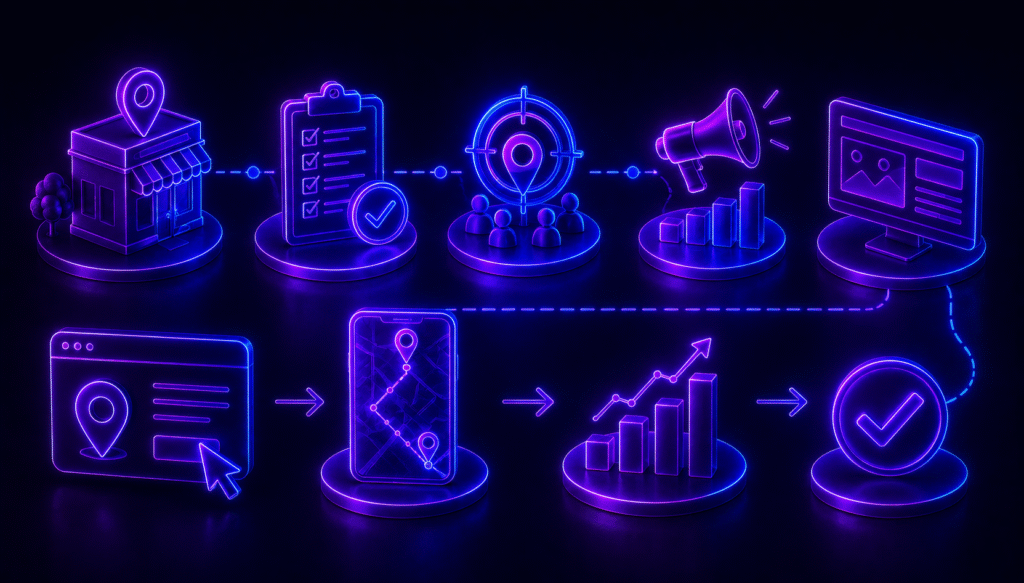
You don’t need a separate platform to advertise on Google Maps. Everything is managed within the Google Ads ecosystem. The basic process looks like this:
1. Create or Optimize Your Google Business Profile
This is the foundation of Maps advertising. Without a Google Business Profile, your business can’t appear in Google Maps Ads. Make sure your profile is complete with the correct business category, a detailed description, business hours, high-quality photos, and your first customer reviews.
2. Set Up Google Ads
Next, create a Google Ads account and link it to your Google Business Profile. This is where you’ll manage your campaigns, budgets, targeting, and ad delivery.
3. Add Location Assets
Location assets connect your business location to your Google Ads account. They allow Google to recognize where your business is located and make it eligible to appear across Google Maps, Google Search, and navigation-related placements.
4. Launch Your Campaign
For most local businesses, Performance Max with store goals is the primary campaign type for promoting physical locations. It enables your ads to appear across multiple Google properties, including Search, Maps, YouTube, Display, and other Google channels, making it one of the standard approaches for driving store visits and local actions.
At the same time, Google Maps Ads are not limited to Performance Max. When location assets are enabled, eligible ads can also appear in Google Maps through Search campaigns and certain other Google Ads campaign types. However, the standalone Local campaigns that were previously used to promote physical locations are no longer considered a current option, as they have been replaced by Performance Max.
Emerging Trends in Maps Advertising to Watch
Maps advertising is evolving rapidly, with new approaches reshaping how businesses attract local customers.
AI and Performance Max as the New Standard
Google continues to move toward automation. Performance Max campaigns use AI to determine where and when ads should appear across Google Search, Google Maps, YouTube, and other Google properties. This reduces the need for manual optimization but makes campaign performance increasingly dependent on the quality of your data — including your Google Business Profile, creative assets, and audience signals.
Apple Maps Ads as an Emerging Channel
Apple is gradually expanding the advertising capabilities of Apple Maps, positioning it as a potential new source of local traffic. Competition is still lower than on Google, but that is likely to change over time — especially among iOS users.
Integration with Navigation
Maps are becoming an increasingly important part of the real-world customer journey. Ads can appear not only when users search for nearby businesses but also while they’re actively navigating. This changes how people make decisions: instead of planning, they can choose where to stop while already on the road, allowing businesses to reach potential customers at the exact moment they’re passing nearby.
Hyperlocal Targeting
The focus is shifting from targeting entire cities to targeting specific neighborhoods, streets, or even a defined radius around a business location. The more precise the geographic targeting, the higher the relevance and effectiveness of the campaign. In large cities, this has become especially important, as businesses often compete within just a few city blocks rather than across the entire city.
All of these trends point in the same direction: Maps advertising is becoming more contextual, more automated, and more closely connected to users’ real-world behavior. The sooner businesses adapt to this approach, the greater their competitive advantage will be.
If you want to maximize the potential of local demand, the newage. team can help you build an effective Google Maps advertising strategy — from optimizing your Google Business Profile to launching and continuously improving your campaigns across Google Maps and other map platforms.
FAQ: Google Maps Ads
Can I run Google Maps Ads without a Google Business Profile?
No. A Google Business Profile is the foundation of Google Maps advertising. It provides the business information used in your ads, and without it, your business cannot appear in Google Maps ad placements.
How long does it take to see results?
You can start receiving impressions and clicks on the same day your campaign goes live. However, it typically takes anywhere from a few days to 2–3 weeks for the campaign to gather enough data and become fully optimized.
Are Google Maps Ads suitable for small businesses?
Yes. In fact, they’re often even more valuable for small businesses than for large brands. With precise local targeting, small businesses can effectively compete for customers within their neighborhood or city.
How are Maps Ads different from regular Google Ads?
The main difference is context. Maps Ads are shown to users who are looking for a nearby business and are ready to take action, while traditional Google Search ads often reach people who are still researching or comparing their options.
Can I rely on Maps Ads without investing in Local SEO?
Technically, yes — but it’s not the most effective approach. The best results come from combining Google Maps Ads with Local SEO, as both strategies reinforce each other and rely on the same foundation: your Google Business Profile.


Get deeper into digital!
Subscribe to the newage. digital digest and receive exclusive bonus content